
Make pixel art from your photo
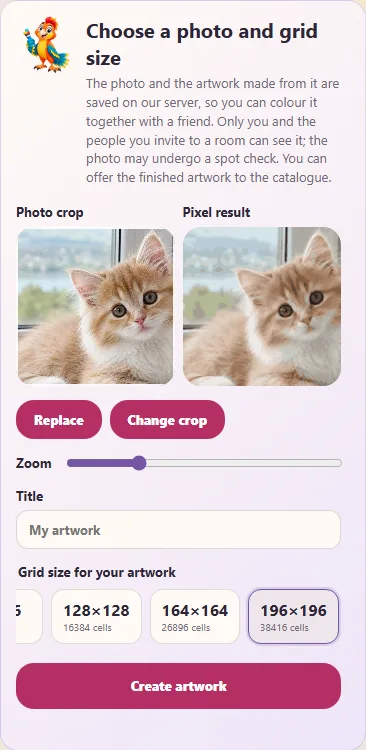
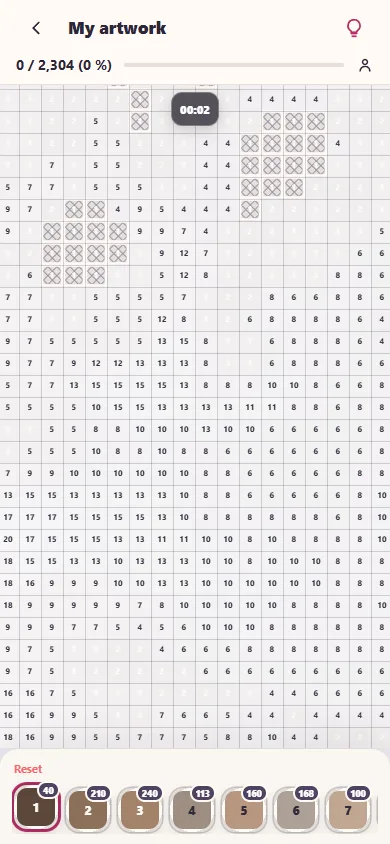
Yes. Pixia turns a personal photo into a pixel picture. You pick the grid size, the photo is reduced to the catalogue palette, and then you fill the numbered squares.
Keep the subject readable at pixel size
Pixel art trades small details for a grid of coloured squares. A close view of a flower or a pet usually reads more clearly than a distant group of people. Crop first, then compare the grid options available in Pixia before committing to a version.
Look at the eyes, outline and background in the preview. If an important feature disappears, enlarge the subject or try a different grid. The frames show the photo controls and a numbered canvas in Pixia, so you can judge the kind of activity before opening the app.
Examples and app screens
These published examples show the app or its catalogue. They are not a live room and do not show a conversion of your own photo.
How it works
- Choose a photo and one of the grid options shown in Pixia.
- Pixia reduces the photo to its palette and builds a numbered pixel grid.
- Fill the squares by number and save the finished pixel picture.
Live picture examples
The examples below show what pictures in this format look like.


